Business IT security is more critical now than ever before but as a business owner what exactly can you do to protect your business?  It seems that no matter how much you spend there is an endless list of new threats that need more time and money spent on them, so why bother.

Cyber security is much like traditional security, there is no end to the amount you could spend to improve the security of your business.  For example your premises security might comprise of:  floodlights, alarms, police response, security cameras, shutters, fencing, security guards.  However, we all know that a determined criminal could break in if they wanted to.  Your aim is therefore to do enough to deter the vast majority of criminals. Once they realise the effort required, most will move on to easier targets.

Over the next few articles we will look at some of the basic steps you can take to protect your business from cyber attacks.  Let’s start of with an easy one which is called 2FA or MFA.

What is 2FA or MFA?

2FA, two-factor authentication and MFA or multi-factor authentication are often used interchangeably. They mean fairly much the same thing in the world of IT security.

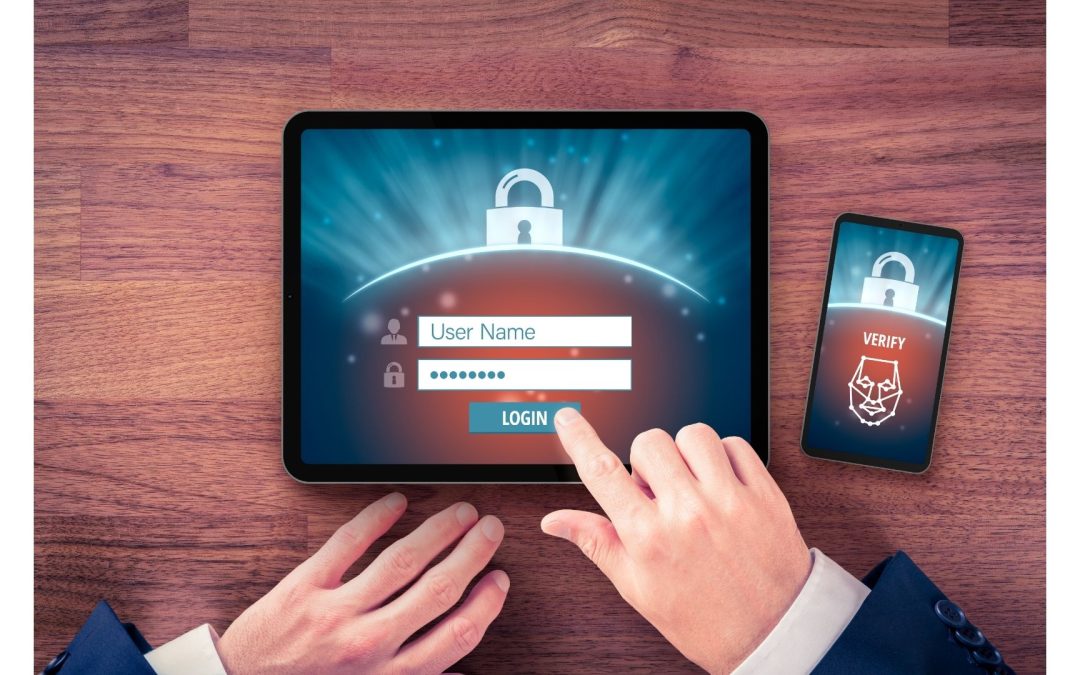
When you log into a website, program or application you normally need a username and password. What is becoming more common is the need to input another piece of information such as a code.  For example, it might be a SMS text sent to your mobile phone.  This code is essentially the 2nd factor that is required to authenticate who you are, hence the name “2FA”.

Essentially you might describe it as:

  • Something you know, like a PIN number
  • Something you have, like a smartphone or secure USB key
  • Something you are, like a fingerprint or facial recognition

Why use 2FA as part of your business IT security?

Having to enter 2 or more bits of information increases the IT security level manyfold. Think of it like chip and pin for your credit card.  If you lose your credit card then a criminal has the potential to go to shops and use contactless payment but at some point they will be requested to enter the 4 digit pin.  Without this secondary piece of information, the card is now useless and will not work again.

2FA is designed so that even if your password is compromised then your account is still safe.  Without the second piece of information the chance of an account breach is close to zero.

Surely passwords are safe?

Passwords are normally quite safe but they do have some weaknesses that make them more vulnerable than we imagine.  Some of the more common issues:

  • People sharing passwords
  • Writing down or storing passwords (without a password manager)
  • Using simple passwords
  • Reusing the same password on multiple sites
  • Using personally identifyable information such as childrens names or birthdates.
  • Websites being hacked making user credentials available

How is 2FA different to a password?

2FA often utilises a piece of information, such as a code, that is only valid for a short period of time – 30 seconds to 5 minutes are quite common.

Now in order to access your account a criminal would need to guess your username, password and this second code that changes each time you try to log in.

As you can see this is highly unlikely and is the reason that 2FA is a simple addition to your business IT security toolbox.
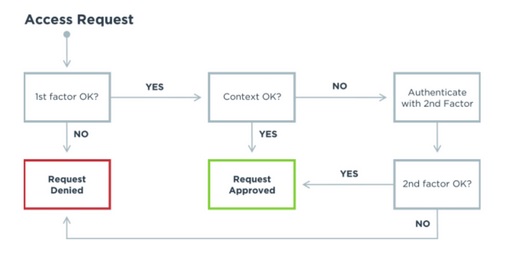
How 2 factor authentication works

Using 2FA

Given that most people carry a smartphone, they lock it and it rarely leaves their side then this is a great way to use 2FA.  There are many apps available to download but the most common are Microsoft Authenticator and Google Authenticator.

Once downloaded then 2FA needs to be turned on within the account settings of the website and it will normally give a QR code for the app to scan.

Once complete the app generates a random code that is valid for 30 seconds and without it there is no way to access the account.

Where to use 2FA

Many places such as banks have enabled 2FA already and it is not possible to utilise their services without this second code.  Banks tend to use SMS text or their own card readers but it is essentially the same thing.

My suggestions for 2FA are:

  • Microsoft Office 365
  • Email scanning accounts
  • Critical business applications holding sensitive information (CRM for example)
  • VPN connections to servers
  • Anywhere a compromised account could be catastrophic

Do you need help?

Have you got to this point and thought – “Yep, I need to do something now but I haven’t got time”.  Maybe you want to implement this yourself but need to check a few things first. Either way we are happy to help.

As a managed IT service company we spend our time helping businesses to get what they need from their IT systems and we would be happy to help you too.  Click the button below and  get a free 15 minute consultation to discuss your business IT and what you need help with.

Our guarantee:

  • There are no hidden charges – this is a 100% free 15 minute consultation with no hidden charges.
  • We will never spam you or sell on your contact details.
  • We will treat your information with absolute confidentiality.


Is Your Data Security Keeping Pace With Your Business?

Most professional service firms believe their data security is under control — but confidence and compliance readiness are not the same thing. As cloud platforms, legacy systems and AI tools increase complexity beneath the surface, the gap between perceived security and actual governance grows. This post examines the questions every regulated firm should be asking about where data lives, who has access, and whether the answers would satisfy an auditor.

Microsoft Teams Just Fixed One of Its Most Annoying Meeting Problems

It is the small software irritations that cause the biggest disruptions. Microsoft Teams has quietly addressed one of its most frustrating quirks, the ease with which you could accidentally quit a meeting mid-conversation. For professional firms where composure and continuity matter, this subtle update is more significant than it sounds.

Why AI is the wrong tool for Passwords

Are the passwords protecting your business as strong as you think they are? AI may seem like a smart shortcut, but when it comes to security, it could be creating hidden weaknesses you can’t afford to ignore.

Why do so many AI projects go nowhere? (A risk-first approach for regulated firms)

Many AI projects stall in regulated firms because the goal is unclear and the risk feels ownerless. Here’s a practical, governance-led way to adopt AI safely, prove value, and keep humans accountable for every decision.

Stop Replacing PCs Early: Build a “Device Health” Routine Instead

A PC usually doesn’t “get old” overnight — it gets burdened. The good news? A few small Windows 11 habits (and one simple monthly routine) can keep business devices running faster for longer and delay expensive replacements.

Beware the Next Generation of Phishing Attacks

Phishing scams are no longer crude or easy to spot. New, smarter attacks are changing the rules — and businesses need to rethink how they stay protected.

Your Browser Knows More Than You Think

Your browser doesn’t just see the websites you visit. It sees patterns, habits, and clues about your business. Most people never check what’s being shared behind the scenes. That’s a risk worth paying attention to.

Is Anyone Controlling AI at Work?

Do you really know how your team is using AI at work?
Uncontrolled AI use is creating serious data and security risks for businesses — often without anyone realising until it’s too late.

Old Passwords Are Still Unlocking Systems

Old passwords your team hasn’t used in years could still unlock your systems — and attackers know it. A recent cyber incident revealed how forgotten credentials put professional service firms at serious risk, and why enforcing MFA has never been more important.

Protecting Your Business from Today’s Smarter Digital Fraud

Digital fraud is evolving at a rapid pace, and modern scams are becoming harder to spot than ever. In this article, we explore practical, everyday habits your team can adopt to stay safer online — and how a few simple tools can make a big difference.

Beware the Next Generation of Phishing Attacks

Phishing scams are no longer crude or easy to spot. New, smarter attacks are changing the rules — and businesses need to rethink how they stay protected.

Ransomware – Behind the Hack [Video Guide]

How would your business react if you were locked out of every single file stored on any PC or cloud platform in your network, with the only way to free your data being to pay vast sums of money to a hacker? Well, ransomware does just that. Despite how crippling this...

4000 small businesses a day: the vicious spread of WannaCry

In May this year the online world witnessed the Wannacry ransomware attack, a cryptoworm which spread like wildfire, demanding payments in the cryptocurrency Bitcoin in over 230,000 computers using the Windows operating system. The National Health Service, the UK's...

Phishing Email: Is that email from Microsoft or a phishing attempt?

Update on how realistic phishing attacks are becoming. Could you tell the difference between a real email and a phishing one?

How to Protect your Business from Cybersecurity Threats

With UK small businesses targeted with 65,000 attempted cyber attacks per day, having robust measures to deal with cyber security threats is more important than ever. The recent attack on SolarWinds proves that no business is safe from hackers and that businesses both...

How To Fix Windows ‘PrintNightmare’ Vulnerability – Video

Microsoft is warning Windows users about a currently unpatched security flaw in the Windows Print Spooler service which is being actively exploited. Whilst waiting on a fix from Microsoft, Window's PCs are potentially vulnerable to be hacked whenever they are switched...

IT Security: Folina Vulnerability Fixed

IT security update: Folina vulnerability has been fixed by Microsoft. How to ensure your system is protected and reverse the temporary fix we suggested.

Protecting Your Business from Today’s Smarter Digital Fraud

Digital fraud is evolving at a rapid pace, and modern scams are becoming harder to spot than ever. In this article, we explore practical, everyday habits your team can adopt to stay safer online — and how a few simple tools can make a big difference.

LastPass Security Breach

LastPass is a password management utility and application allowing companies and people to store their passwords. After a recent breach there are some serious security issues that need attention. This article looks at what these issues are and how to re-secure your passwords.

8.4 Billion Passwords Leaked In “RockYou2021” Hack – How To Protect Your Business

The largest password collection of all time was recently leaked onto a hacker forum, with an eye-watering 8,459,060,239 (8.4 billion) unique entries stored in a 100GB TXT file putting potentially billions of logins at risk.  Dubbed as ‘RockYou2021’ after the RockYou...